

Best overall for rain protection: a laptop bag with documented waterproof construction, including its seams and closure. Best cushioned inner layer: the PROTEQ Padded Laptop Sleeve; best office-bag candidate: the PROTEQ Laptop Bag, with exact device fit and rain protection checked before you choose a waterproof laptop bag for monsoon in 2026.
- Choose a waterproof laptop bag for monsoon by its documented seams, closure and protection conditions—not its product name.
- The PROTEQ Padded Laptop Sleeve is the pick for slim, cushioned protection inside your carrying bag.
- For MacBook sleeve fit, match your exact model to the product listing before ordering.
- Water resistance and cushioning answer different questions; neither establishes waterproof protection.
Why this matters
A monsoon buying decision has two separate parts: keeping rain away from your laptop and protecting the device while you carry it. Padding does not establish waterproofing. A waterproof fabric does not establish a waterproof bag.
For a MacBook owner, fit belongs beside those checks—not after them. A sleeve must accommodate the exact device without forcing the closure or leaving unnecessary movement around it.
This 2026 guide ranks buying options by their job. The rain-protection pick needs documented construction; the sleeve pick supplies cushioning; the office-bag pick addresses professional carrying. Treat those as distinct roles, not interchangeable promises.
What makes the best monsoon laptop bag
Use these criteria before comparing product names:
- Documented rain protection: Look for a claim covering the complete bag, with conditions you can understand. A fabric claim alone leaves the closure and seams unanswered.
- Closure and seams: Check how the opening closes and how stitched joins handle water. Assess the whole enclosure, not just its main panel.
- Exact laptop fit: Match the device to confirmed compatibility or usable internal dimensions. A screen-size label is not a complete fit check.
- Cushioning: Look for documented padding around the laptop. Check corner protection separately; do not infer it from a padded product name.
- Professional carrying: Choose a shape and carrying arrangement that suits your workday. A sleeve and a laptop bag serve different purposes.
- Packing discipline: Check whether the laptop, sleeve and other items fit without straining the closure. Keep the device away from wet accessories.
Buy the protection you can verify, not the protection a name suggests. That rule applies equally to a waterproof-labelled sleeve, an office bag and a dedicated rain-protection enclosure.
Monsoon options at a glance
| Rank and option | Best for | Standout feature or buying requirement | Key limitation |
|---|---|---|---|
| 1. Documented waterproof laptop bag | Choosing the main rain barrier | Evidence covering the complete enclosure, seams and closure | Waterproof claims still have defined conditions of use |
| 2. PROTEQ Padded Laptop Sleeve | Adding slim cushioning inside a carrying bag | Cushioned protection in a slim, lightweight profile | A sleeve does not replace the carrying bag or establish its rain protection |
| 3. PROTEQ Laptop Bag | Considering a professional office carrier | Described as a 15.6-inch premium laptop bag for professionals | The size label does not confirm exact MacBook fit or waterproof performance |
The first option is a buying specification, not a named product recommendation. Keep it first because rain protection is the central requirement of a waterproof laptop bag for monsoon—not an optional extra.
1. Documented waterproof laptop bag: best for rain protection
A documented waterproof laptop bag is the default choice when you need the carrying bag itself to act as the rain barrier. Look for evidence that covers the complete enclosure rather than a statement about one material.
In 2026, judge that evidence against your actual journey. A claim describing brief splashes does not answer the same question as a claim describing sustained rain exposure. Neither automatically establishes protection during immersion.
Waterproof laptop bag pros
- Puts the main rain-protection requirement at the centre of your purchase.
- Gives you specific construction details to compare, including seams and the opening.
- Lets you check the stated use conditions against your commute.
Waterproof laptop bag cons
- Protection depends on using the closure as instructed.
- The waterproof claim does not establish cushioning or exact laptop fit.
- A suitable rain barrier can still be the wrong carrying format for your workday.
Best for: You want one main enclosure selected specifically for documented rain protection.
Before ordering, read the care and closure instructions alongside the protection claim. Check whether the stated protection applies to every compartment or only the laptop enclosure; do not extend a claim beyond its scope.
Verdict: Buy only when complete-bag protection, device fit and use conditions are documented.
2. PROTEQ Padded Laptop Sleeve: best for slim inner cushioning
The PROTEQ Padded Laptop Sleeve provides cushioned protection in a slim, lightweight profile. It is the named pick for professionals who want a padded inner layer rather than another full carrying bag.
That is a clear role. Use the sleeve decision to address cushioning and fit; use the outer-bag decision to address rain protection and carrying requirements.
Padded Laptop Sleeve pros
- Cushioned protection is stated in the product description.
- The slim profile suits buyers looking for an inner sleeve.
- The lightweight design keeps the sleeve's purpose focused on the device.
Padded Laptop Sleeve cons
- A sleeve is not a replacement for your main carrying bag.
- Cushioning alone does not establish corner-specific impact protection.
- Exact MacBook compatibility needs confirmation from the product listing.
Best for: You already have a suitable carrying bag and want a slim, cushioned laptop layer inside it.
Do not assume the sleeve fits every MacBook because a product title or URL contains a protection term. Confirm your model, the sleeve's usable dimensions and any restrictions on fitting a laptop with a fitted case.
Verdict: Buy for confirmed fit and slim cushioning; hold the waterproof decision to product-specific evidence.
3. PROTEQ Laptop Bag: best for an office-carry shortlist
The PROTEQ Laptop Bag is described as a 15.6-inch premium laptop bag designed for professionals. Consider it when your main decision is the office carrier rather than a separate inner sleeve.
The 15.6-inch label gives you a starting point, not a compatibility guarantee. For a MacBook, confirm the actual fit through the product listing rather than translating that screen-size label into an assumed model match.
Laptop Bag pros
- The product is a laptop bag rather than an inner sleeve.
- Its stated positioning is for professionals.
- The product description supplies a size designation to begin your fit check.
Laptop Bag cons
- A size designation does not establish usable internal dimensions.
- Professional positioning does not establish monsoon protection.
- Adding a sleeve creates another fit requirement inside the bag.
Best for: You need a professional laptop carrier and are comparing device fit and rain-protection evidence before buying.
For a 2026 monsoon purchase, treat this as an office-bag candidate until its documented protection matches your intended use. Do not infer sealed seams, protected zips or a rain cover from the product category.
Verdict: Hold until the listing confirms the fit and protection your commute requires.
Check fit before you choose
For MacBook owners, the useful question is not whether a bag is described as large enough. It is whether the exact laptop fits correctly, with the closure working normally and the intended padding positioned around the device.
Follow this order:
- Identify the model. Use the exact MacBook model information, not only the screen-size family.
- Check compatibility. Look for that model in the product listing. If dimensions are supplied instead, compare usable internal dimensions with the device's external dimensions.
- Allow for layers. Include a fitted case if you use one. For a sleeve inside a bag, compare the sleeve's external dimensions with the bag's usable laptop compartment.
- Check the closure. The device should not force the sleeve or bag opening. Follow the product's fitting instructions.
- Check movement. Inspect how the device sits inside the enclosure. Extra space is not the same thing as cushioning.
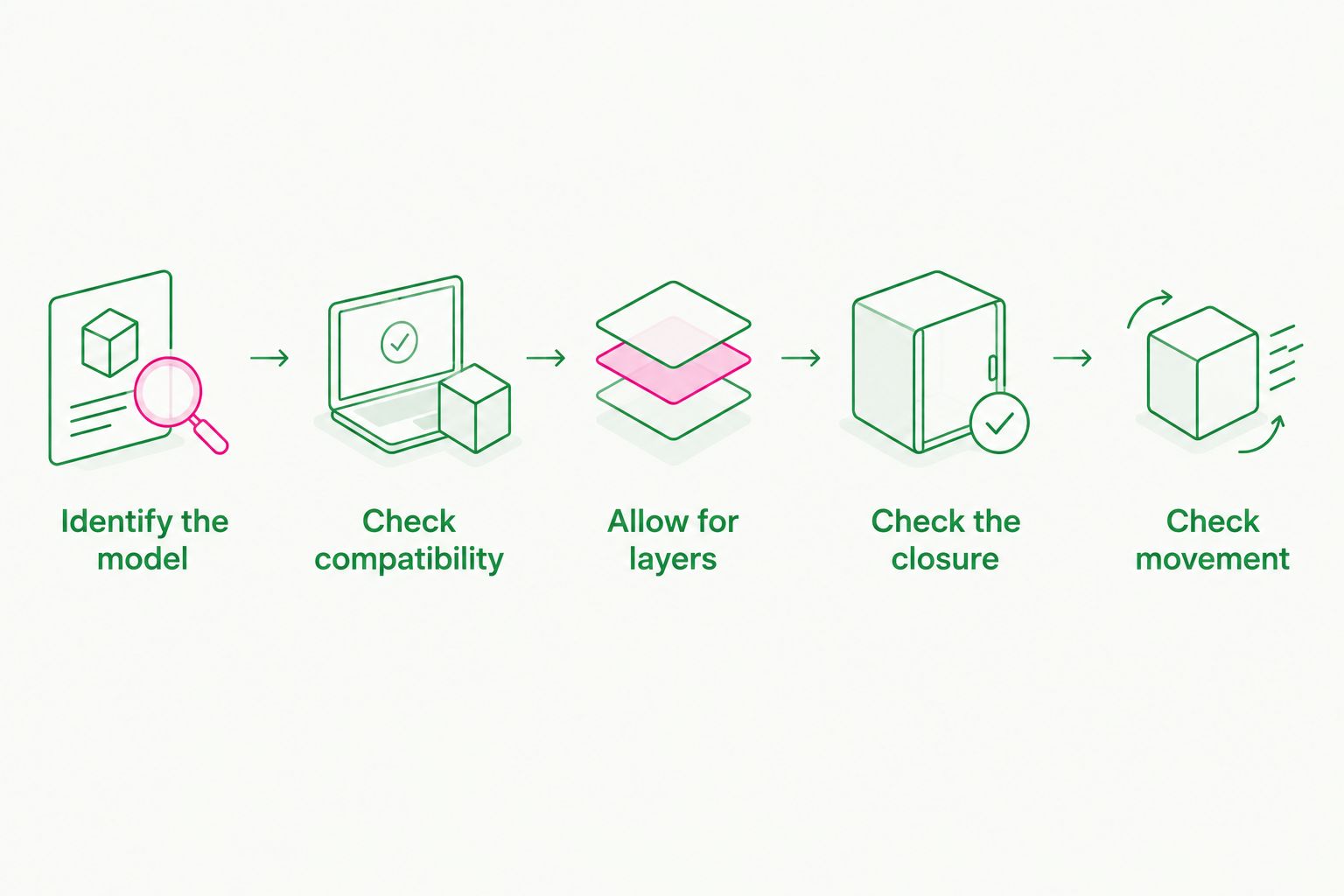
Exact fit comes before a familiar screen-size label. Keep the compatibility check tied to the current product listing when ordering in 2026; do not substitute a general claim that a sleeve fits MacBooks.
Choose your carrying layer
The two products below serve different buying decisions: a cushioned inner sleeve and a professional laptop bag. Select the format first, then confirm fit and the protection details relevant to your journey.


Water-resistant is not waterproof
Water resistance and waterproofing are not interchangeable buying claims. Read the stated conditions and the part of the product covered by the claim before deciding whether it answers your monsoon requirement.
A water-resistant outer fabric can leave other questions unresolved. You still need to assess seams, openings and closures. Conversely, a documented waterproof enclosure still needs a separate fit and cushioning check.
Ask these questions when comparing listings:
- Does the claim describe the fabric or the complete bag?
- Does it cover the main opening and stitched seams?
- What exposure conditions does the seller actually describe?
- Does the closure need a particular setup to work as intended?
- Are the laptop and accessory compartments covered by the same claim?
Avoid turning a demonstration into a broader promise. Water beading on a panel shows what happened on that panel; it does not, by itself, establish the behaviour of the complete bag.
Pack for the journey you actually make
The best-fitting enclosure still needs sensible packing. Close it as instructed, keep its opening unobstructed and avoid packing accessories in a way that strains the closure.
Keep a wet umbrella or other damp item separate from the laptop enclosure. An outer rain barrier does not solve moisture introduced inside the bag.
For a sleeve-and-bag setup, check both layers before leaving. The sleeve should fit the device; the bag should accommodate the filled sleeve without squeezing its opening or interfering with the bag's own closure.
After a wet journey, inspect the outside before opening the laptop compartment. Dry the exterior according to the care instructions, and avoid transferring surface water onto the device as you unpack.
How these options are ranked
The ranking follows the purchase criteria: complete-bag rain protection first, slim cushioning second, professional carrying third. Those are separate use cases, so a sleeve does not outrank a rain barrier on waterproofing, and an office bag does not gain waterproof status from its appearance.
Product-specific recommendations use the stated product descriptions. Exact model fit, corner cushioning and waterproof performance remain listing-level checks—not assumptions built into the ranking.
Which monsoon laptop option should you choose?
Choose a documented waterproof laptop bag when the main enclosure must protect against rain. Confirm its closure, seams, fit and stated exposure conditions before buying.
Choose the padded sleeve when you need a slim cushioning layer inside an appropriate carrier. Choose the office bag when you need a professional carrying format, then evaluate its rain protection separately.
For your 2026 shortlist, keep the order simple: confirm device fit, verify the complete enclosure's rain claim, then decide whether a separate cushioned sleeve belongs inside it. Do not trade a verified requirement for an attractive product label.
FAQ
What's the best waterproof laptop bag for monsoon?
The best choice is a bag with documented waterproof protection covering the complete enclosure, including its seams and closure. Confirm that its stated use conditions match your journey and that your exact laptop fits.
Is a water-resistant laptop bag enough for monsoon rain?
Water resistance alone does not establish protection for your monsoon journey. Read the stated exposure conditions and check whether the claim covers the complete bag or only its outer material.
Is the padded sleeve a good choice for MacBook owners?
The padded sleeve is a candidate for slim, cushioned protection when the product listing confirms your exact MacBook fit. Do not infer compatibility from the sleeve category or a screen-size label.
Will a 15.6-inch laptop bag fit my MacBook?
A 15.6-inch label does not confirm exact MacBook compatibility. Check the product listing for your model or compare usable internal dimensions with your device's external dimensions.
Is a laptop sleeve better than a laptop bag for monsoon?
A sleeve and a laptop bag serve different roles. Choose the sleeve for confirmed fit and cushioning, and select the carrying enclosure separately for documented rain protection.
Does padding mean a laptop sleeve protects the corners?
Padding alone does not establish corner-specific impact protection. Look for product details that explicitly describe the corner construction and the protection it provides.
Should I put a laptop sleeve inside my office bag?
Use a sleeve inside your office bag when you want a separate cushioned layer and both products fit together correctly. Check the filled sleeve's dimensions against the bag's usable compartment, and assess the bag's rain protection separately.
One last thing
Before you buy, ask: What protects the laptop at the opening? A product description that explains the outer material but leaves the closure unanswered has not answered your whole rain-protection question.
Then check the same opening with your device inside. Fit and closure are linked: your laptop, sleeve and accessories must not prevent the enclosure from closing as intended.