

Best named shortlist pick: PROTEQ Padded Laptop Sleeve for documented cushioning and a slim profile. Best for wet-weather exposure: a sleeve with documented waterproof construction; best for lighter everyday exposure: a sleeve with documented water resistance—confirm exact MacBook fit before choosing any option in 2026.
- PROTEQ Padded Laptop Sleeve is the named shortlist pick for cushioning and a slim, lightweight profile.
- Choose a waterproof laptop sleeve for macbook only when exact fit and waterproof construction are documented.
- Water resistance is not waterproofing; check the closure and seams, not just the outer fabric.
- Match your MacBook model to the listing before choosing a laptop sleeve or adding a shell.
Why this matters
Fit first. Cushioning next. Water protection must be documented. A sleeve that looks right but does not match your MacBook is the wrong purchase, regardless of its protection claims.
The supplied product description confirms cushioned protection in a slim, lightweight profile. It does not establish model-specific MacBook compatibility, reinforced corner construction or a waterproof test result. Treat those as buying checks, not benefits already proved by a product name.
This 2026 guide separates a named product from construction-based alternatives. The alternatives are buying categories, not claims that a particular unnamed sleeve has passed testing.
What makes the best MacBook sleeve
Use these criteria before comparing designs:
- Exact fit: Look for your MacBook model in the compatibility listing. A screen-size label alone does not establish fit.
- Cushioned protection: Check what the listing says about padding, lining and corner construction. General cushioning does not prove reinforced corners.
- Water protection: Distinguish a water-resistant surface from a waterproof sleeve. Look for evidence covering the complete enclosure.
- Closure design: Inspect how the sleeve closes and whether the stated water protection includes that opening.
- Slim carry: Choose a profile that fits your existing work bag without forcing the laptop compartment shut.
- Professional use: Prioritize easy access and a practical carry setup over decorative features that do not answer your protection needs.
Apply 3 checks before buying: model compatibility, protection evidence and everyday carry fit. A sleeve that fails any check should stay off your shortlist.
Best MacBook sleeve options at a glance
| Rank and option | Best for | Standout reason to consider it | Key limitation |
|---|---|---|---|
| 1. PROTEQ Padded Laptop Sleeve | Professionals prioritizing cushioning and a slim profile | Product description states cushioned protection and a slim, lightweight profile | Exact MacBook fit, corner reinforcement and waterproof performance require confirmation |
| 2. Sleeve with documented waterproof construction | Buyers whose main concern is water exposure | Evidence covering the enclosure, seams and closure | The waterproof claim must specify its conditions; padding needs a separate check |
| 3. Sleeve with documented water resistance | Buyers seeking an everyday moisture barrier | A stated water-resistant construction matched to routine carry | Water resistance does not establish protection during immersion |
There is no price-based ranking here. Choose the protection category first, then compare the current listings against your MacBook and the way you carry it.
1. PROTEQ Padded Laptop Sleeve: best for slim cushioned carry
The supplied description states that this sleeve provides cushioned protection in a slim, lightweight profile. That makes it a relevant shortlist option for professionals who want a sleeve inside their everyday work bag, rather than a separate carrying system.
PROTEQ Padded Laptop Sleeve is the named pick for professionals prioritizing documented cushioning and a slim profile. That verdict covers the stated construction, not an unverified waterproof rating or guaranteed MacBook fit.
Pros
- The product description explicitly states cushioned protection.
- The stated slim profile suits buyers prioritizing compact carry.
- The stated lightweight design aligns with a sleeve used inside another bag.
Cons
- The supplied description does not confirm exact MacBook model compatibility.
- Reinforced corners, drop-test performance and waterproof conditions are not established by the supplied description.
Best for: Professionals comparing slim padded sleeves and willing to confirm their exact MacBook fit before purchase.
For your 2026 shortlist, inspect the product listing for internal dimensions, supported models and construction details. Do not treat the waterproof wording in the page address as evidence that the closed sleeve prevents water ingress.
Verdict: Hold until exact fit and the water-protection details match your requirements. The documented cushioning earns consideration; the name alone does not settle the purchase.
2. Documented waterproof sleeve: best for water-exposure concerns
A documented waterproof sleeve is the right category to investigate when water exposure drives your decision. The useful evidence concerns the complete sleeve, including its opening and seams—not just the material used on the outside.
Look for a clear explanation of what the waterproof claim covers. If the listing describes only a water-repellent fabric, you have evidence about that fabric, not proof of a waterproof enclosure.
Pros
- Documented conditions let you compare the claim with your intended use.
- Closure and seam information addresses entry points that a fabric-only claim leaves unanswered.
- Clear enclosure details help separate water protection from ordinary padding.
Cons
- Waterproof construction does not automatically establish cushioning or corner protection.
- A sleeve's stated water-protection conditions do not establish suitability for every kind of exposure.
Best for: Buyers who need water protection to be a documented purchase criterion rather than a descriptive label.
Check how the closure must be secured. Protection that depends on correct closure cannot be assessed from an open product photo, and an attractive exterior tells you nothing about the sealing instructions.
Verdict: Buy only when the documented water protection and exact MacBook fit both meet your requirements. Skip listings that substitute a waterproof headline for an explanation of the enclosure.
3. Documented water-resistant sleeve: best for everyday moisture barriers
A sleeve described as water-resistant belongs in a different category from a documented waterproof enclosure. It is a relevant option when you want a stated moisture barrier for routine carry and do not require an immersion claim.
Read the scope carefully. Water resistance can describe the outer material without establishing that the closure and seams resist water to the same extent.
Pros
- Clear water-resistant wording avoids confusing the product with a waterproof enclosure.
- A documented fabric treatment gives you a specific feature to assess.
- This category lets you prioritize fit and cushioning alongside a stated moisture barrier.
Cons
- Water resistance does not establish protection during immersion.
- A surface claim alone does not establish protection at the opening or seams.
Best for: Buyers whose carry requirements do not depend on a fully waterproof sleeve and who can identify the scope of the water-resistant claim.
For a 2026 comparison, ask whether the listing describes the fabric, the assembled sleeve or a tested condition. Those are different statements. Choose according to the statement the seller actually supports.
Verdict: Buy for its documented use; skip if you need waterproof enclosure evidence. Do not upgrade a water-resistant claim in your own buying decision.
Confirm your MacBook fit
Start with the laptop, not the sleeve's size selector. Your goal is an explicit compatibility match or usable internal dimensions—not a similar-looking device in a photograph.
Identify the model
Check the exact MacBook model you own. Keep its model information available when reading the sleeve listing, and do not assume that a sleeve described for one MacBook fits another.
A model-specific compatibility statement is the most direct answer. Where the listing does not provide one, request confirmation before ordering rather than inferring fit from the product category.
Check internal dimensions
Compare the laptop's dimensions with the sleeve's usable interior. External sleeve dimensions include its construction and cannot substitute for the space available to your device.
Begin with 2 internal measurements: width and depth. Then check usable thickness and opening clearance. Measurements are useful only when the listing makes clear what has been measured.
Include your shell
If your MacBook wears a rigid shell, assess the complete device with that shell attached. Bare-laptop compatibility does not establish compatibility with added material around the laptop.
Tell the seller that you use a shell when asking about fit. Do not force a closure to accommodate a configuration the listing does not support.
Check bag fit
Finally, compare the closed sleeve with your work bag's laptop compartment. The laptop fitting the sleeve is only half the decision; the sleeve must also fit the space where you intend to carry it.
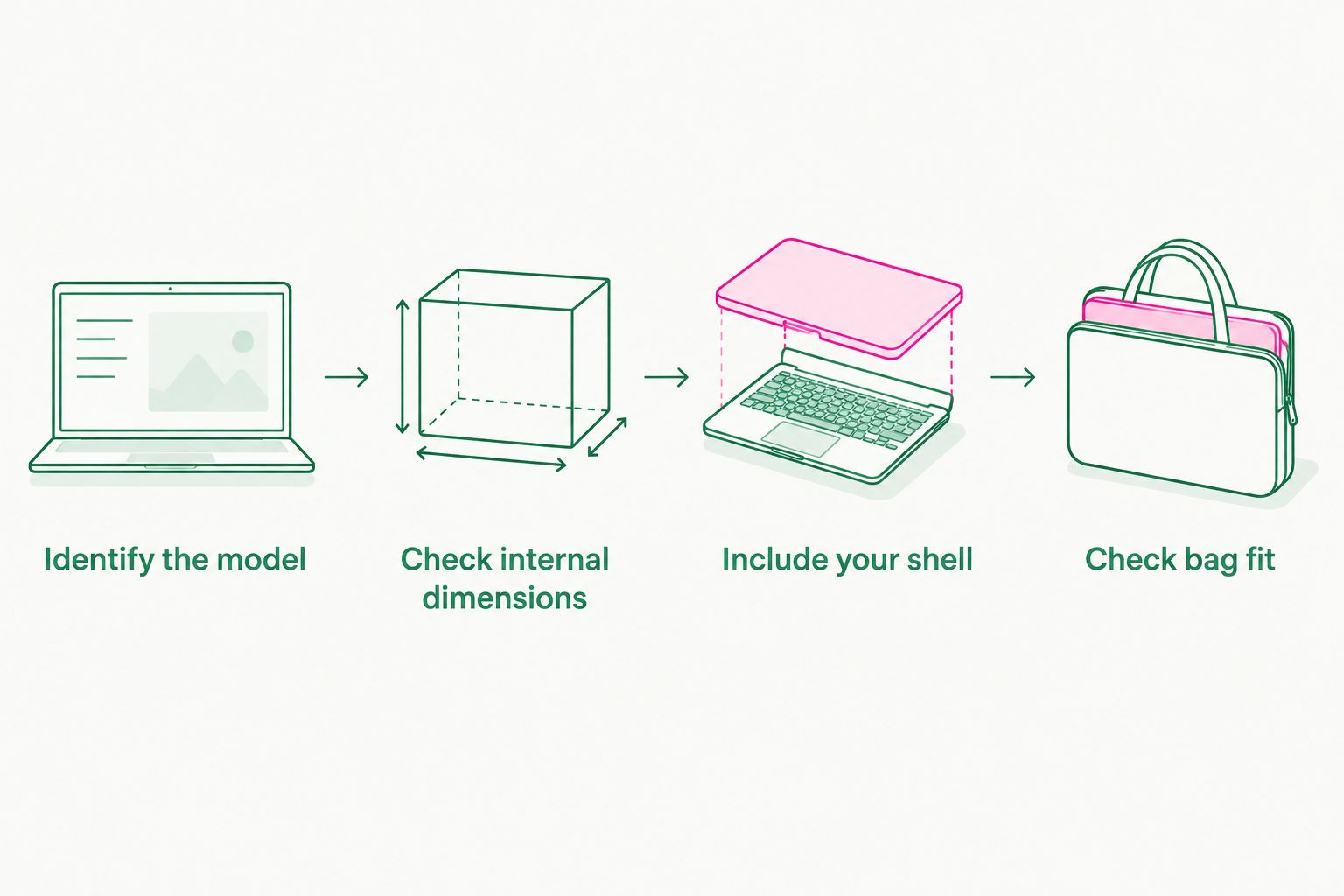
Choose for 1 laptop configuration: the device exactly as you carry it. That means accounting for any shell before deciding whether the sleeve's fit is right.
Read the protection claim correctly
A useful 2026 product listing separates cushioning, corner construction and water protection. None of those features proves the others.
Cushioning is not a drop guarantee
Padding describes part of a sleeve's construction. It does not, by itself, establish a tested drop height, impact rating or guaranteed outcome.
Look for specific corner-cushioning information if edge protection is your priority. Do not convert a general statement about cushioned protection into a claim about reinforced corners.
Fabric is not the enclosure
A water-resistant or waterproof material is only part of the sleeve. The opening and seams also matter when assessing whether the complete enclosure matches a water-protection claim.
Read what the seller says about those components. If the explanation stops at the fabric, keep your conclusion limited to the fabric.
Instructions define the use
Check any stated closure, care and exposure instructions before choosing. A claim with defined conditions is more useful for your decision than a broad adjective without an explanation.
Do not buy a stronger claim than the listing makes. Water-resistant means water-resistant; padding means padding. Keep each benefit tied to its own evidence.
How this shortlist is ranked
This shortlist ranks options by the buying question they answer: slim cushioned carry, documented waterproof construction or a documented everyday moisture barrier. It does not present a laboratory performance comparison.
PROTEQ appears as the named sleeve option because its supplied product description establishes cushioning and a slim, lightweight profile. The construction-based alternatives show what to look for when water protection is the deciding factor.
Fit is the gatekeeper. After that, compare the protection evidence and the complete carry setup using the same criteria for every option.
Which MacBook sleeve should you choose?
Choose the padded sleeve category when confirmed fit and compact cushioned carry are your priorities. Choose documented waterproof construction when water protection is the requirement that determines the purchase.
For the undecided buyer in 2026, start with your exact model and your existing bag. Keep the named padded sleeve on the shortlist, but wait for model compatibility and water-protection confirmation before treating it as your waterproof MacBook solution.
A sleeve is ready to buy when its listing answers your actual questions. A product name is not a substitute for those answers.
FAQ
What's the best waterproof laptop sleeve for MacBook in 2026?
The best choice is a sleeve with confirmed fit for your exact MacBook and documented waterproof construction. PROTEQ Padded Laptop Sleeve is a named shortlist option for documented cushioning and a slim profile, but its supplied description does not establish exact MacBook fit or waterproof conditions.
Does a sleeve with the same screen-size label fit my MacBook?
A matching screen-size label does not confirm MacBook compatibility. Check the exact model listing and usable internal dimensions before choosing.
Is a water-resistant laptop sleeve the same as a waterproof sleeve?
No, water resistance does not establish waterproof protection. Read whether the claim covers only the outer material or the complete sleeve, including its opening and seams.
Can I use a MacBook sleeve with a hard shell attached?
Use a sleeve with a hard shell only when the complete configuration fits its usable interior and opening. Compatibility stated for a bare MacBook does not confirm fit with a shell.
Does a padded laptop sleeve protect against every drop?
Padding does not establish protection against every drop. Look for documented impact testing and specific corner-construction details rather than assuming a guaranteed outcome.
What should I check before buying a sleeve for my work bag?
Check exact laptop fit, protection evidence and the closed sleeve's fit inside your work bag. A sleeve that fits the MacBook still needs to fit your bag's laptop compartment.
One last thing
The opening deserves as much attention as the outer fabric. A sleeve can have a water-protection claim about its material without a corresponding claim about its closure.
Before buying, inspect the closed product photos and read the closure instructions alongside the compatibility details. Ask a specific question: does the stated water protection cover the assembled, closed sleeve or only its fabric?
That answer narrows your shortlist more effectively than another waterproof headline. Buy the documented fit and construction—not the adjective.